The Problem
Freelancers juggling several concurrent clients lose project update discipline fast: the update happens in a text message to yourself, or nowhere, because opening a project management tool mid thought is friction the update doesn't survive.
Architecture
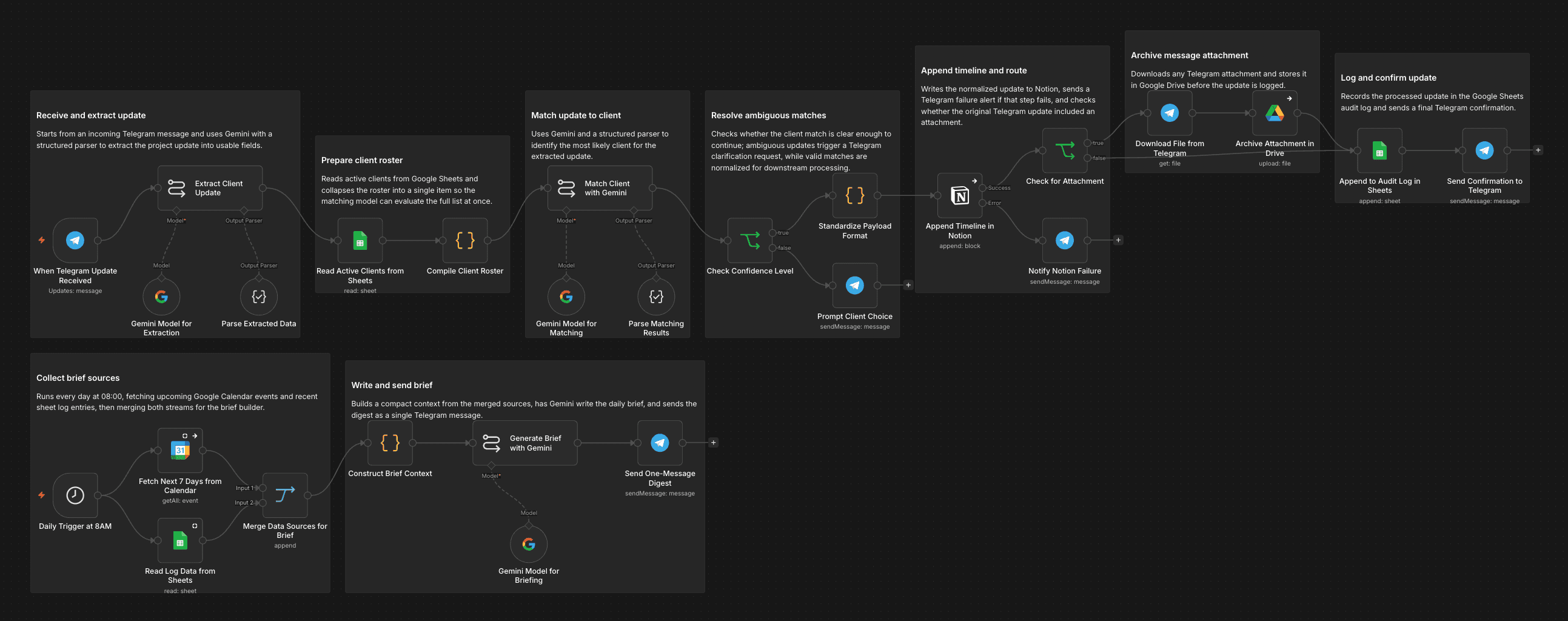
Telegram Message → Gemini Extraction (client hint, status, blocker, deadline, summary) → Match Client Against Sheets Roster (Gemini, confidence score) → [low confidence: ask for confirmation, don't log] → [confident: append Notion timeline entry] → [has attachment: archive to Drive] → Log Audit Row (Sheets) → Telegram Confirmation || Daily 08:00: Calendar + Log context → Gemini morning brief → Telegram digest
What It Does
Structured extraction from a single freeform message: one Telegram message becomes a typed record (client, status, blocker, deadline, summary) via Gemini, with no form, no menu, no explicit fields to fill in: the interface is "just text your update."
Confidence gated client matching, not a hard match/no match: the client matching step returns a confidence score, and anything below threshold triggers a Telegram clarification question instead of either guessing wrong or silently dropping the update. Nothing gets logged against the wrong client.
Attachments handled as a side path: if the Telegram message includes a file or photo, it's downloaded and archived to a per client Drive folder as a parallel step, not blocking the core timeline logging path if it fails.
A daily digest that closes the loop: every morning, the workflow pulls calendar context and the prior day's log entries and has Gemini write a short brief, so the freelancer gets a synthesized view of what they logged instead of needing to reread a Notion timeline manually.
Engineering Focus
The confidence gated matching is the piece worth examining closely: it's the difference between a genuinely useful low friction logger and one that occasionally files an update against the wrong client silently, which for a freelancer's own record keeping is the failure mode that actually matters.
What I'd Harden
Before relying on this daily I'd want: a way to correct a wrongly logged entry after the fact (right now there's no edit/undo path), stricter validation on the Notion block ID target so a misconfigured integration fails loudly instead of writing nowhere, and a confidence threshold tuning pass based on actual false match data rather than a default value.
Gallery